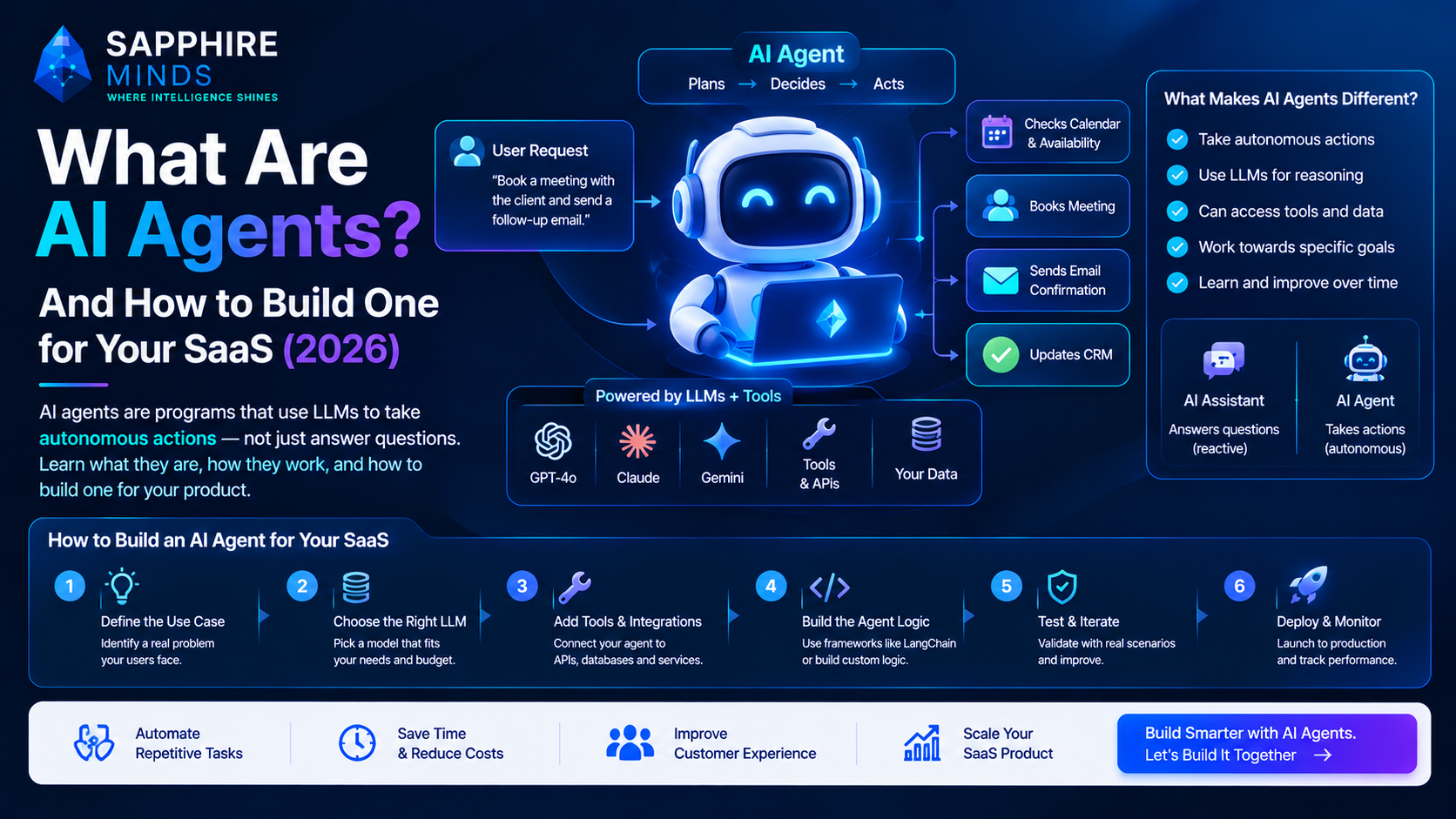
An AI agent is a program that uses a large language model to take autonomous actions — not just answer a question, but plan, decide, use tools, and complete multi-step tasks without human input at every step.
A chatbot waits for your question and responds. An AI agent receives a goal and figures out how to achieve it — searching the web, querying a database, sending an email, writing code, or calling an API — all on its own.
In 2026, AI agents have moved from research projects to production deployments. If you're building SaaS, understanding agents is no longer optional.
Chatbot vs AI Agent — the real difference
This is the most misunderstood concept in AI right now.
Chatbot (what most people have built so far):
User: "Summarise this document"
AI: [reads document, returns summary]
Done. One step.
AI Agent:
User: "Research our top 10 competitors and
       draft a competitive analysis report"

Agent step 1: Search the web for competitors
Agent step 2: Visit each competitor's website
Agent step 3: Extract pricing, features, positioning
Agent step 4: Compare against your product data
Agent step 5: Draft a structured report
Agent step 6: Save to Google Docs and notify Slack
Done. Six steps, zero human involvement.
The agent decided which tools to use and in what order. That's the defining characteristic.
The four components every AI agent needs
1. A brain (the LLM) The language model that reasons, plans, and decides what to do next. GPT-4o, Claude 3.5 Sonnet, and Gemini 1.5 Pro are the most capable in 2026 for agent tasks requiring complex reasoning.
2. Tools (what the agent can do) Functions the agent can call to interact with the world:
Web search (Tavily, Brave Search API)
Code execution (E2B, Daytona)
File read/write
Database queries
API calls (Slack, Gmail, Notion, Stripe)
Browser control (Playwright, Puppeteer)
The more tools, the more capable the agent — but also the more ways it can fail. Start with 2-3 tools maximum.
3. Memory Agents need to remember what they've done across steps:
Short-term: the current conversation/task context
Long-term: past interactions, user preferences (stored in a vector database)
Without memory, every agent run starts from zero.
4. An orchestration loop The logic that runs the agent: observe the current state, decide which tool to use, use it, observe the result, decide the next step. This continues until the task is complete or the agent decides it cannot continue.
Agent frameworks in 2026
LangChain Agents The most widely used. Good ecosystem, many pre-built tool integrations, active community. LCEL makes composing agent logic readable. LangSmith for observability is genuinely excellent.
python
from langchain.agents import AgentExecutor, create_openai_tools_agent
from langchain_openai import ChatOpenAI
from langchain.tools import tool

@tool
def search_competitors(query: str) -> str:
    """Search for competitor information"""
    your search implementation
    return results

agent = create_openai_tools_agent(
    llm=ChatOpenAI(model="gpt-4o"),
    tools=[search_competitors],
    prompt=prompt
)
executor = AgentExecutor(agent=agent, tools=[search_competitors])
LlamaIndex Workflows Better for document-heavy agent tasks. If your agent primarily reads, processes, and reasons over documents — contracts, reports, PDFs — LlamaIndex's workflow abstraction handles this more cleanly.
OpenAI Assistants API The easiest entry point. OpenAI manages the orchestration loop, memory, and tool calling for you. Less flexible but significantly faster to get to a working prototype.
CrewAI Multi-agent orchestration — multiple specialised agents collaborating. One agent researches, another writes, another edits. Still maturing but genuinely impressive for complex workflows.
Real AI agent use cases in SaaS products
Sales intelligence agent: Given a company name → researches the company online → checks CRM for existing contacts → finds the right decision maker on LinkedIn → drafts a personalised outreach email → adds a task to Salesforce.
Support triage agent: Receives incoming ticket → classifies severity and category → searches knowledge base for resolution → drafts response → if unsolvable, escalates with full context to human agent.
Code review agent: Triggered on pull request → reads changed files → checks against coding standards → identifies bugs and security issues → posts inline comments on GitHub.
Data analysis agent: Given a natural language question ("what drove the revenue drop last month?") → queries your database → runs calculations → generates charts → writes a plain-English summary.
What makes agents fail in production
Tool call reliability: Agents fail when tools return unexpected formats or errors. Every tool needs robust error handling and clear documentation so the LLM understands what the tool does and when to use it.
Hallucinated tool calls: The LLM sometimes invents tool arguments that don't exist. Validate tool inputs strictly before execution.
Infinite loops: Agents can get stuck repeating the same actions. Implement step limits and break conditions.
Cost: An agent that takes 20 LLM calls to complete a task at GPT-4o pricing costs significantly more than a single chatbot response. Model your costs before going to production.
Latency: Multi-step agents are slow. A 10-step agent using GPT-4o might take 30-60 seconds. Set user expectations or run agents asynchronously.
Should you build an agent or a simpler AI feature?
Build an agent when:
The task genuinely requires multiple steps that can't be predicted in advance
The agent needs to react to intermediate results before deciding what to do next
The value is specifically in the automation of a complex workflow
Use a simpler LLM call when:
The task is a single transformation (summarise, classify, generate)
You know all the steps upfront (use a pipeline, not an agent)
Latency and cost are critical
Most "AI agent" features in production are actually multi-step pipelines with fixed logic — not true agents. That's fine. Fixed pipelines are more reliable and predictable. Only use true agents when the task genuinely requires dynamic decision-making.
At Sapphire Minds, we build production-grade AI agents for SaaS products — from sales automation to document intelligence to autonomous support systems. Book a free 30-minute consultation →