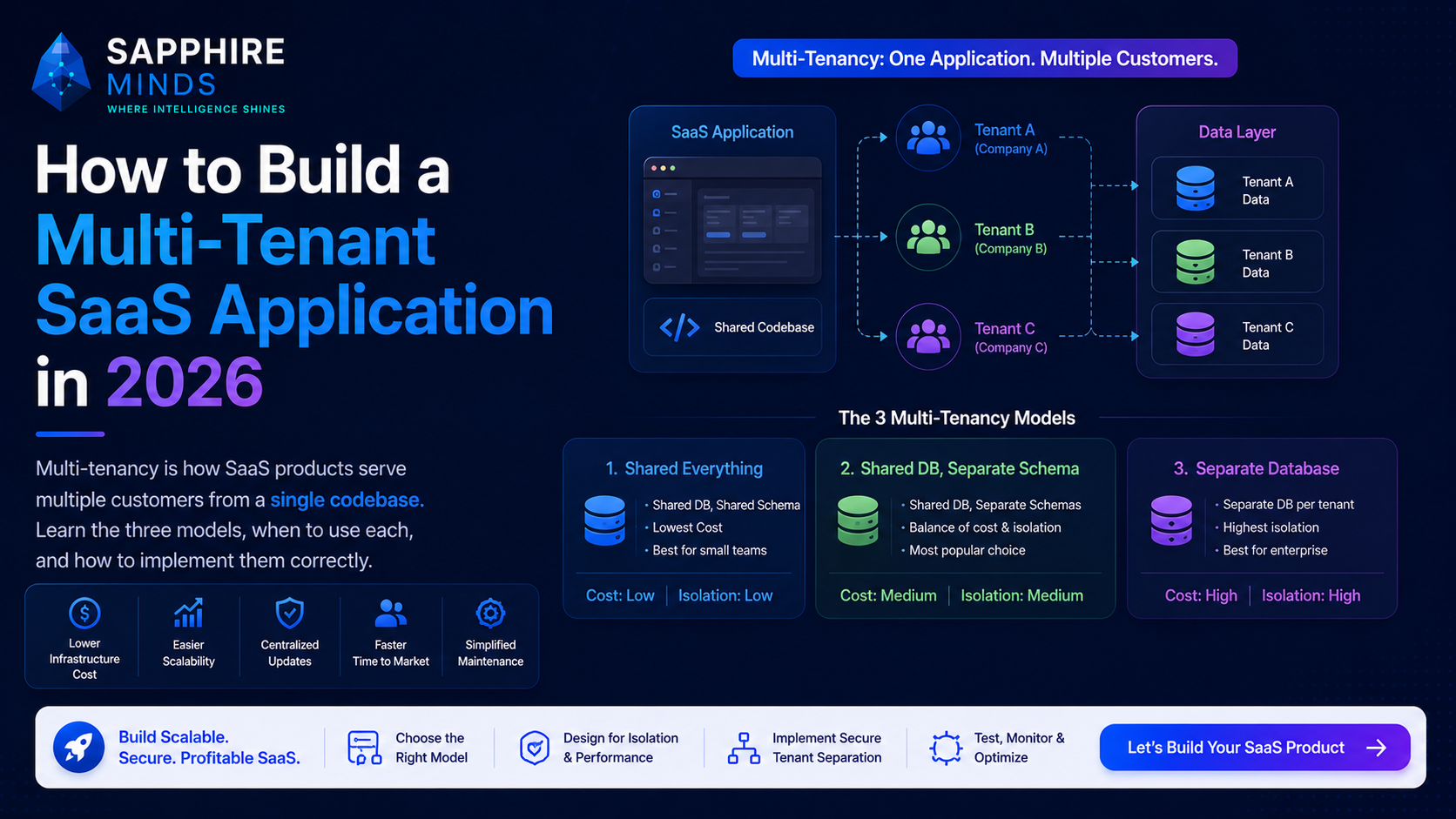
Multi-tenancy is the architecture that makes SaaS economics work. Instead of deploying a separate instance of your application for every customer, a multi-tenant system serves all customers from the same codebase, database, and infrastructure — with data properly isolated between them.
Getting it right from the start saves you from expensive rewrites later. Getting it wrong creates security vulnerabilities and makes scaling painful.
The three multi-tenancy models
Model 1 — Shared database, shared schema (row-level isolation) All tenants share the same database tables. Every table has a tenant_id column. Queries are always filtered by tenant_id to ensure tenants only see their own data.
-- Every table has tenant_id
SELECT * FROM projects
WHERE tenant_id = 'tenant_abc123'
AND user_id = 'user_xyz';
Pros: Simplest to build, easiest to manage, cheapest to operate at scale. Cons: Highest risk of data leakage if tenant_id filtering is ever missed. Noisy neighbour risk — one tenant's heavy queries affect others. Best for: Early-stage SaaS, cost-sensitive products, teams that can enforce tenant filtering rigorously.
Model 2 — Shared database, separate schemas All tenants share the same database server but each has their own schema (namespace). Tables like tenant_abc.projects and tenant_xyz.projects exist separately.
-- Connect to tenant-specific schema
SET search_path TO tenant_abc123;
SELECT * FROM projects WHERE user_id = 'user_xyz';
Pros: Better data isolation than shared schema. No tenant_id filtering required in application code. Easier tenant-level backups and restores. Cons: Schema migrations must run for every tenant (manageable with tooling). More database objects to manage. Best for: Mid-market SaaS, products with compliance requirements, teams moving up from shared schema.
Model 3 — Separate database per tenant Each tenant gets their own database instance. Complete isolation at the infrastructure level.
Pros: Maximum data isolation. Tenant databases can be on different servers, regions, or cloud providers. Simple compliance — each tenant's data is physically separate. Cons: Significantly more expensive and operationally complex. Schema migrations must run across many databases. Connection pooling becomes critical. Best for: Enterprise SaaS with strict compliance requirements (HIPAA, FedRAMP), products where customers contractually require data isolation.
Which model to choose for your SaaS
For most SaaS products in 2026: start with shared database, shared schema (Model 1).
It's the fastest to build, cheapest to operate, and can be migrated to Model 2 later if compliance requirements demand it. The key is enforcing tenant isolation rigorously from day one — this is a code review and testing discipline, not an architecture choice you can defer.
If your customers are enterprises with compliance requirements from the start, begin with Model 2.
Only choose Model 3 if your customers contractually require database-level isolation. The operational complexity is significant.
Implementing tenant isolation in your application
Step 1 — Tenant identification Determine how you identify which tenant a request belongs to:
Subdomain routing:
acme.yourapp.com→ tenant = acmeCustom domain:
app.acme.com→ tenant = acme (requires DNS configuration per tenant)JWT claims: Token includes
tenant_idclaim, validated on every requestURL path:
/t/acme/dashboard→ tenant = acme (less common, less clean)
Subdomain routing is the most common and cleanest approach for most SaaS products.
Step 2 — Middleware enforcement Every authenticated request must resolve the tenant and make it available throughout the request lifecycle. Never let a request proceed if tenant resolution fails.
// Express middleware example
async function tenantMiddleware(req: Request, res: Response, next: NextFunction) {
  const subdomain = req.hostname.split('.')[0]
  const tenant = await TenantRepository.findBySubdomain(subdomain)

  if (!tenant || !tenant.isActive) {
    return res.status(404).json({ error: 'Tenant not found' })
  }

  req.tenant = tenant
  next()
}
Step 3 — Data access layer All database queries must be scoped to the current tenant. The safest pattern is a base repository class that automatically applies tenant_id filtering:
class TenantRepository {
  constructor(private tenantId: string, private model: Model) {}

  async findAll(where?: Partial): Promise {
    return this.model.findAll({
      where: { ...where, tenantId: this.tenantId }
    })
  }

  async findOne(where: Partial): Promise {
    return this.model.findOne({
      where: { ...where, tenantId: this.tenantId }
    })
  }
}
This pattern makes it structurally impossible to forget the tenant_id filter — it's in the base class.
Subscription and billing in multi-tenant SaaS
Each tenant needs a billing subscription. The standard setup with Stripe:
Create a Stripe Customer per tenant on signup
Attach a Stripe Subscription to the Customer for their plan
Store
stripe_customer_idandstripe_subscription_idon your Tenant recordHandle webhook events to keep subscription status in sync
Enforce plan limits in your data access layer:
async function createProject(tenant: Tenant, data: CreateProjectDto) {
  const projectCount = await ProjectRepository.count(tenant.id)
  const limit = PLAN_LIMITS[tenant.plan].projects

  if (projectCount >= limit) {
    throw new PlanLimitExceededError('project', limit)
  }

  return ProjectRepository.create(tenant.id, data)
}
Common multi-tenancy mistakes
No tenant isolation in tests. Write integration tests that verify cross-tenant data leakage is impossible. Run these on every CI build.
Admin endpoints without tenant scoping. Internal admin APIs often skip tenant middleware. This is a data exposure risk.
File storage without tenant isolation. S3 prefixes or separate buckets per tenant. Never share a flat file namespace across tenants.
Session fixation. If a user logs in, then the tenant changes (e.g. switching accounts), ensure the session is invalidated and re-created.
Building multi-tenant SaaS with Sapphire Minds
Multi-tenant architecture is something we implement on every SaaS project. We've built shared-schema, separate-schema, and database-per-tenant systems across various scales and compliance environments.
Discuss your SaaS architecture →